
When your team needs one place for projects, docs, search, and AI, security cannot be an afterthought. TOW builds The Only Workspace, a secure team workspace software platform that combines project management, documentation, company memory, and reviewable AI in a single environment you can run in the cloud, on your own infrastructure, or in a fully air-gapped environment.
TOW is built for organizations that want strong admin control without forcing teams back into disconnected tools. If you need clear identity rules, explicit project access, controlled AI usage, and data ownership that fits your environment, TOW gives you a practical way to centralize work without handing away control.
TOW secure workspace software gives admins control over identity, deployment, and access
TOW gives you deployment choices that match your risk model. You can use TOW Cloud, self-host TOW on controlled infrastructure, or operate it in a fully air-gapped environment, which is critical when shared SaaS assumptions do not fit your security requirements.
TOW also documents the product as a private, single-tenant workspace, so your team works inside an environment designed for controlled access rather than broad multi-tenant exposure.
“TOW supports cloud, self-hosted, and fully air-gapped operation choices for controlled team workspaces.”
Identity is where secure access starts, and TOW supports SAML, OIDC, and LDAP providers so you can connect workspace access to the systems your organization already trusts. That matters for distributed teams, especially when users connect from different locations, devices, and networks across cloud and on-premises environments.
This is the kind of control model security teams are looking for now. NIST guidance for cloud-native access emphasizes identity-tier policies, monitoring, and step-up authentication, and TOW gives you the identity and deployment foundation to apply those policies inside a unified workspace.
“TOW identity controls include SAML, OIDC, and LDAP providers, giving admins a direct path to existing access policies.”
TOW also applies access checks where they matter in daily work. Its documentation states that personal access tokens are checked against the user’s current membership, role, groups, project access, and item-level security, helping you avoid the stale or over-privileged access patterns that often build up across separate collaboration tools.
For browser sessions, TOW documents HTTP-only session cookies with same-site lax settings and recommends production use over trusted HTTPS origins. That gives your team a clearer starting point for secure deployment reviews.
“TOW checks personal access tokens against current membership, role, groups, project access, and item-level security.”
TOW reduces SaaS sprawl by unifying projects, docs, memory, and review in one workspace
A secure workspace is not only about login controls. It is also about reducing the number of copies, connectors, and side channels your team depends on to get work done.
TOW brings issues, boards, goals, roadmaps, docs, wiki content, workspace memory, search, collaboration, notifications, and reviewable AI into one workspace. Because projects, docs, memory, and review share context inside TOW, your team spends less time passing copied links between separate tools and less time exposing work through extra integrations.
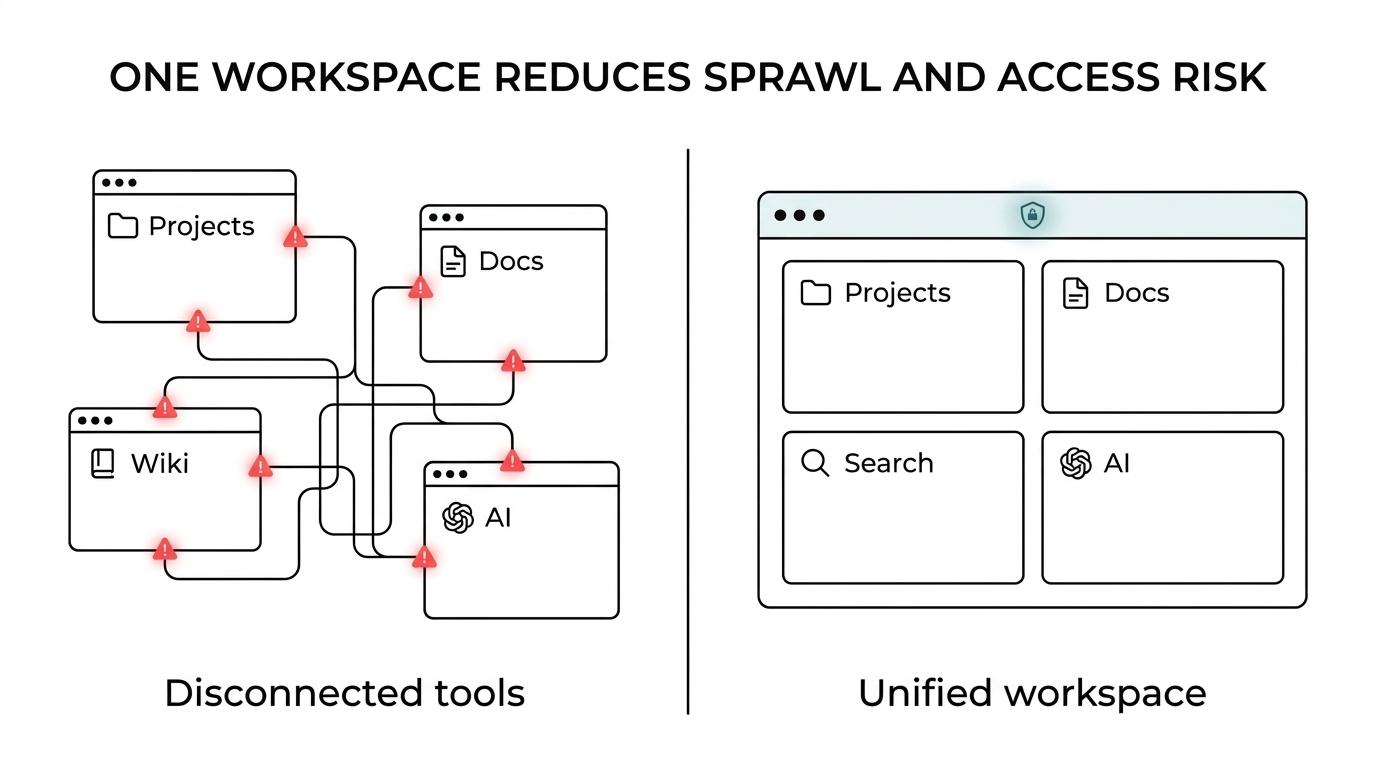
That is a real buying concern now. Recent SaaS security research shows that oversharing, unauthorized SaaS uploads, and third-party app exposure remain active problems, and Verizon’s 2025 DBIR reports that third-party involvement in breaches doubled to 30% while credential abuse remained a leading initial attack vector. TOW addresses that risk by reducing tool fragmentation and making project access explicit at the person and permission level.
When your workspace is spread across project software, docs, wikis, note apps, and AI add-ons, admin review becomes slower and exceptions become normal. TOW gives you a single operating surface to manage instead of a chain of separate products with separate permissions, tokens, and integration policies.
TOW reviewable AI keeps automation useful and permission-aware
AI can help your team move faster, but only if admins can control where it runs, what it can access, and how outputs are reviewed. TOW includes workspace-aware AI agents with human review, so AI actions can stay tied to the permissions and context already defined inside the workspace.
TOW gives administrators concrete options here. You can configure AI providers, use BYOK, choose TOW-managed AI endpoints, disable AI entirely, or require review before actions move forward. That means you do not have to choose between useful AI assistance and a controlled workspace model.
TOW’s approach is especially relevant if your team is concerned about shadow AI usage, external data oversharing, or unclear provider boundaries. Instead of bolting AI onto a stack of disconnected tools, TOW keeps AI inside the same workspace where your projects, docs, and permissions already live.
TOW helps startups and enterprises that need secure team workspace software with data ownership
TOW is a strong fit when your team wants modern collaboration features without losing deployment control. It is designed for organizations worldwide, from startups to enterprises, that need integrated projects, docs, and AI with strong admin controls and clear data ownership.
You are likely a good fit for TOW if you need to:
- Consolidate tools: Replace or reduce dependence on separate project, wiki, doc, and AI tools that create duplicated permissions and extra integration risk.
- Control infrastructure: Choose between TOW Cloud, self-hosted deployment, or fully air-gapped operation based on your environment and policies.
- Keep AI governable: Use permission-aware AI with BYOK, provider control, optional disablement, and human review instead of unmanaged AI add-ons.
TOW is also practical when budget and rollout risk matter. Small organizations can start with TOW’s free self-hosted tier, while larger teams can adopt a deployment model that fits internal security reviews and infrastructure requirements.
If you are moving away from a fragmented stack, TOW also supports migrations from Jira, Confluence, and Notion. That gives you a path to centralize work without asking teams to rebuild everything by hand.
TOW makes admin control clearer without forcing teams into slower work
Security controls only help if people can still use the product every day. TOW combines boards, issues, goals, roadmaps, docs, wiki, search, notifications, and workspace memory so teams can plan, document, review, and retrieve knowledge in one place instead of switching across systems.
That improves more than convenience. It makes access easier to reason about, reduces the chance of forgotten documents in side tools, and gives your admins fewer systems to review when permissions, providers, or data handling rules change.
TOW is aiming toward parity with the mix of tools many teams currently stitch together, including Jira, Confluence, Notion, and Linear. For organizations that want that capability in a more controlled workspace model, TOW offers a direct alternative path.
Start with TOW in the cloud or on your own infrastructure
If you want secure team workspace software that gives your admins real control over identity, access, infrastructure, and AI, TOW is built for that job. You can start in TOW Cloud, deploy TOW on your own infrastructure, or discuss an air-gapped setup based on how your team needs to operate.
Talk with TOW about your environment, your access model, and the tools you want to replace, and we can help you map the right workspace setup for a more controlled way to run projects, docs, and AI.